

Database workloads are major drivers of AWS spend due to over-provisioned instances, unoptimized storage, 24/7 non-production environments and inefficient queries. Organizations can cut expenses significantly without compromising availability or SLAs by optimizing compute, storage, architecture and query performance.
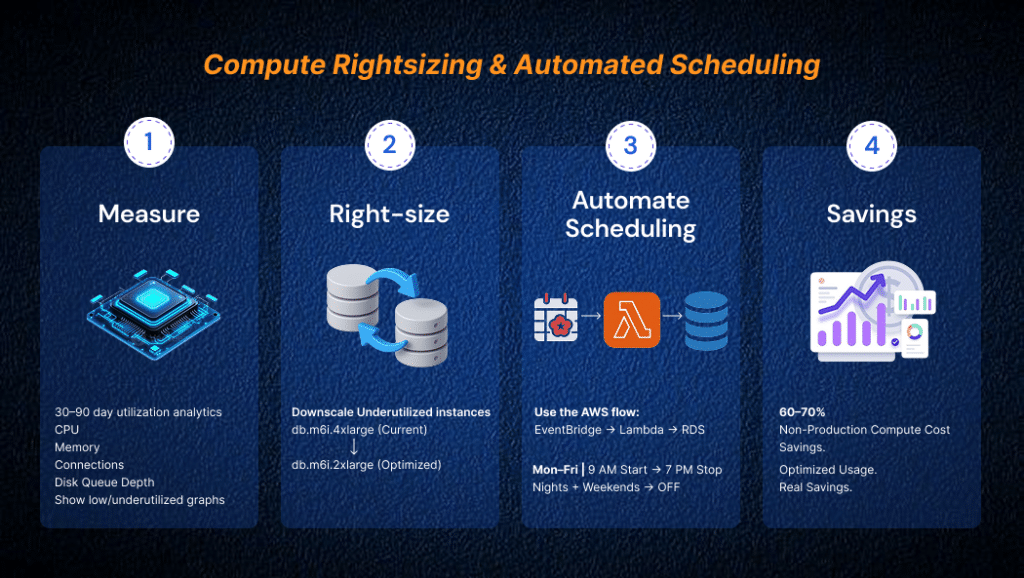
Compute Rightsizing & Non-Production Scheduling
- Instance Rightsizing: Evaluate peak vs. average CPU, memory, connections and disk queue depth over 30–90 days. Downscale underutilized instances (e.g., from db.m6i.4xlarge to db.m6i.2xlarge) when continuous utilization remains low.
- Automated Scheduling: Stop development, testing and QA databases outside business hours (e.g., run Mon–Fri, 9 AM–7 PM; stop nights and weekends) using EventBridge and Lambda to cut non-production compute costs by up to 60–70%.
Architectural Rightsizing (Replicas & Multi-AZ)
- Read Replicas: Monitor ReplicaLag, CPUand connections. Offload reporting or heavy analytics to analytical stores like Amazon Redshift or Athena and decommission unused or redundant replicas.
- Multi-AZ Classification: Reserve Multi-AZ strictly for production. Use Single-AZ with automated snapshot restoration for UAT/Staging, Single-AZ for Dev and Single-AZ with GP3 for sandboxes.
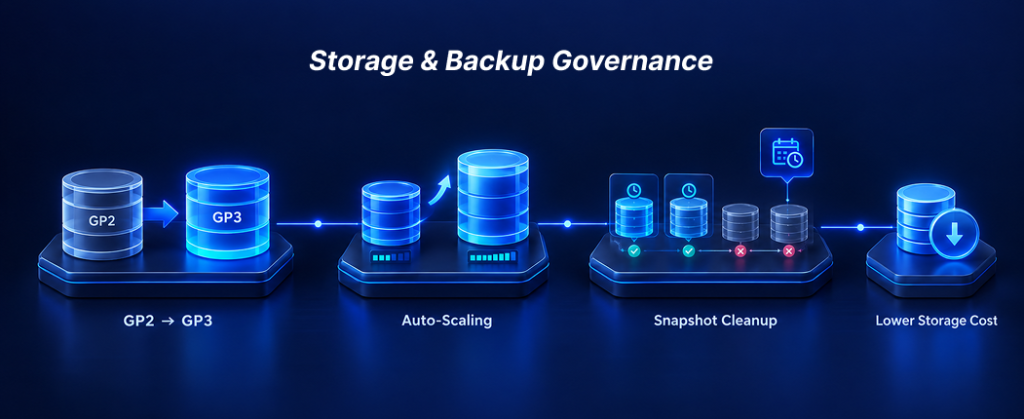
Storage & Backup Governance
- Migrate GP2 to GP3: Convert legacy GP2 volumes to GP3 on Amazon RDS for lower baseline costs and independent scaling of IOPS and throughput.
- Storage Auto-Scaling: Provision conservative baseline storage and let RDS Auto-Scaling expand capacity dynamically.
- Snapshot Cleanup: Set automated retention limits (e.g., 7 days for dev, 30 days for prod). Implement cleanup scripts to purge obsolete manual DB snapshots and cross-region copies, which do not expire automatically.
Database Version & Extended Support Costs
Extended Support fees
Amazon RDS applies Extended Support charges once a database engine (MySQL, PostgreSQL, or SQL Server) runs past its standard AWS end-of-support date. These charges are billed per vCPU-hour, in addition to standard compute and storage costs, and escalate further after the second year under Extended Support. Without a structured engine-version governance process, this creates a recurring cost stream that is easy to overlook — since it does not appear as a distinct compute or storage line item, but accumulates silently against outdated engine versions.
Hidden efficiency cost
Older major versions also miss out on engine-level performance improvements (better query planners, storage engine optimizations) shipped in newer versions — teams often compensate by over-provisioning instance size instead of upgrading, compounding the cost impact.
Action
Track engine version against AWS’s published EOL calendar as its own governance metric, not just instance sizing. Schedule major version upgrades proactively (test in staging first) rather than letting versions drift for years and accumulating Extended Support charges.
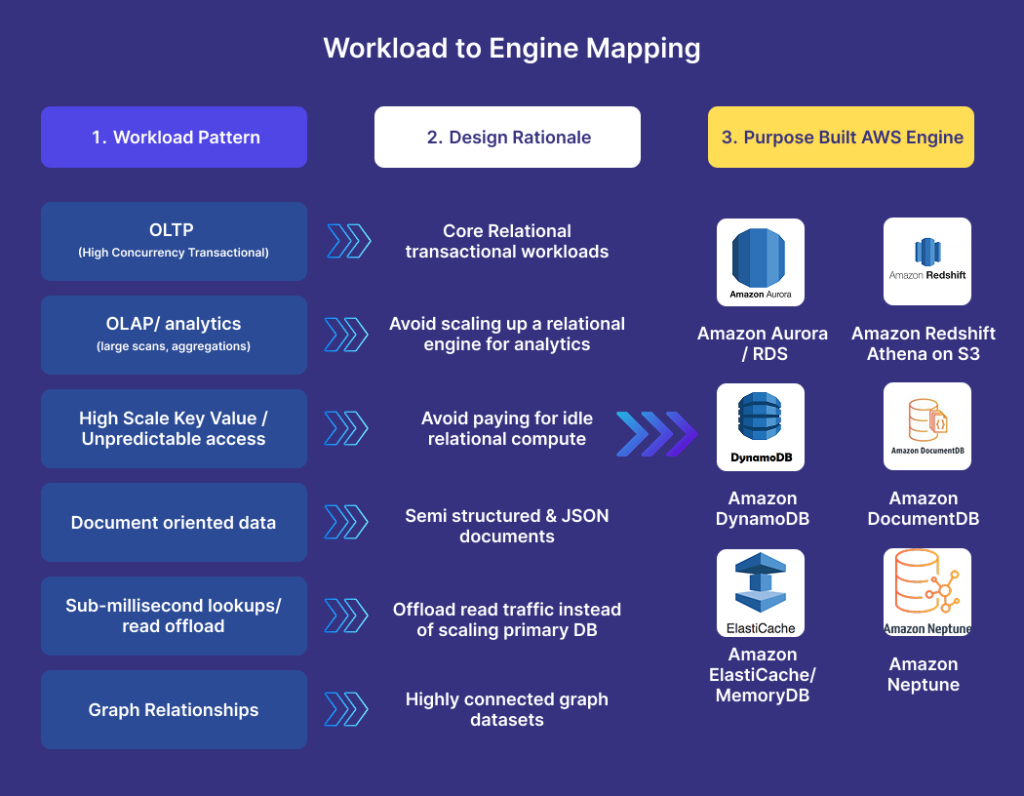
Database Engine Selection by Workload Category
Mismatch drives cost
A major source of inefficiency is forcing every workload onto one general-purpose relational engine instead of matching the engine to the workload shape. This shows up as instances being resized upward repeatedly — often a workload-fit problem, not a capacity growth problem.
Workload-to-engine mapping
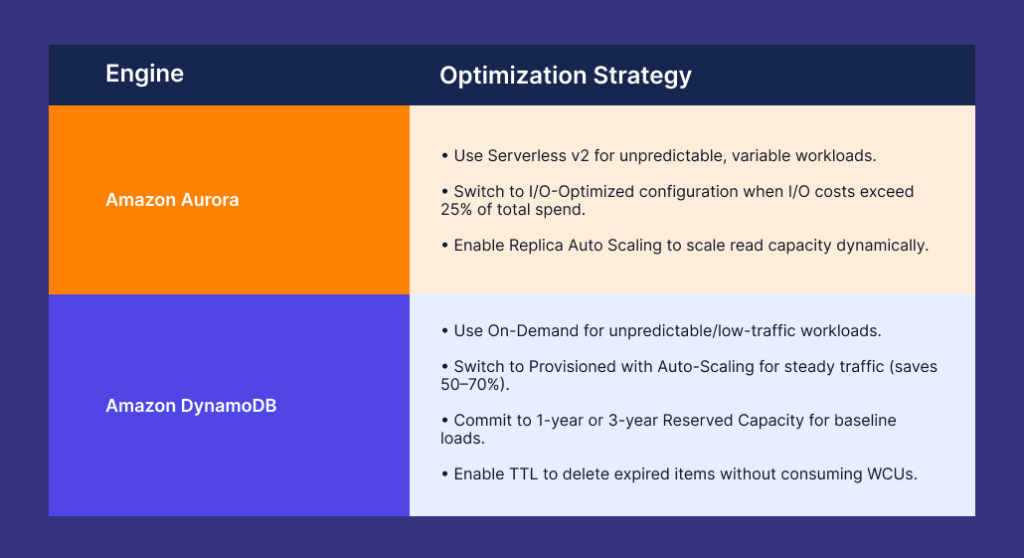
- OLTP (high-concurrency transactional) → Aurora/RDS
- OLAP/analytics (large scans, aggregations) → Redshift or Athena on S3 — not a relational engine scaled up
- High-scale key-value / unpredictable access → DynamoDB, to avoid paying for idle
- relational compute. Document-oriented data → DocumentDB
- Sub-millisecond lookups / read offload → ElastiCache/MemoryDB instead of scaling the primary DB to absorb read traffic
- Graph relationships → Neptune
Action
Whenever an instance is being resized for the second or third time, treat that as a trigger to re-evaluate engine fit, not just bump the instance class again.
Licensing Mode
For SQL Server/Oracle, License-Included pricing bundles the license cost into the hourly instance rate — often the largest hidden multiplier on the bill. Where feasible, migrating to an open-source-compatible engine (Aurora PostgreSQL/MySQL) eliminates licensing cost entirely; where the engine must stay, BYOL with existing licenses (if already owned) is cheaper than License-Included at scale.
Query Tuning & Connection Management
- Query Optimization: Identify bottlenecks via RDS Performance Insights and slow-query logs. Add missing indexes to prevent full-table scans, remove unused indexes and batch read/write operations to eliminate N+1 patterns.
- Connection Pooling: Use Amazon RDS Proxy or application pools (e.g., PgBouncer, HikariCP) to multiplex connections, reduce dedicated memory overhead and prevent compute scaling forced by idle connections.
Observability & Automation Checklist
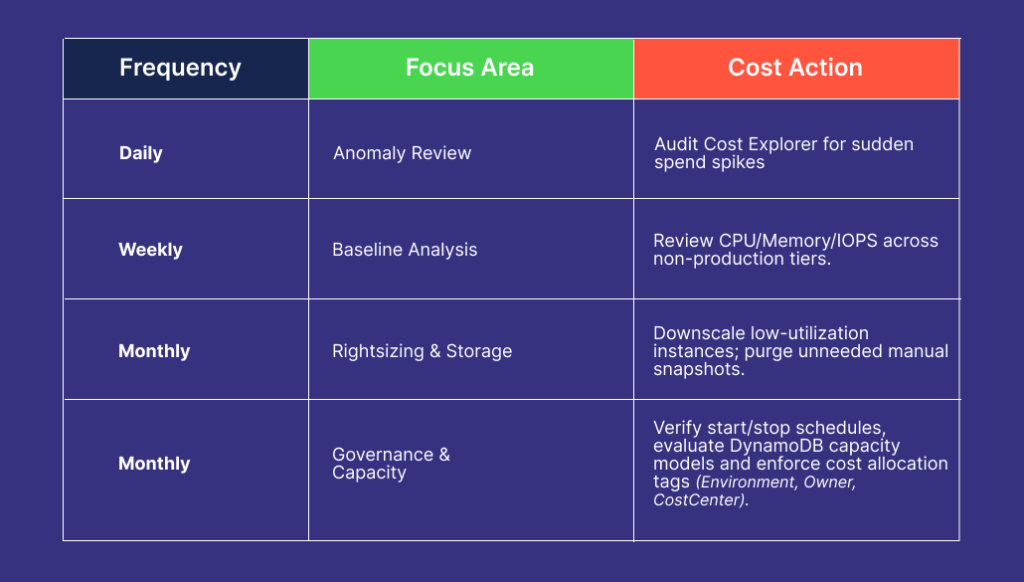
Key metrics to monitor: CPUUtilization, FreeableMemory, DatabaseConnections, FreeStorageSpace, ReadIOPS/WriteIOPS and DiskQueueDepth.
Conclusion
Optimizing AWS database costs is an ongoing engineering process, not a one-time task. The goal is to maximize financial efficiency while maintaining required availability, data durability and performance SLAs.
By systematically applying instance rightsizing, automated scheduling, storage conversion, query tuning and tag-based cost governance, organizations can build a lean, performance-oriented AWS database architecture.
Written by the Infimatrix Cloud and AI team.